



At a Glance
- Online accounts do not close automatically after death — each platform has its own process, and most require someone to initiate it
- Social media accounts can usually be memorialised or deleted, but only if a family member knows to ask
- Email is often the key to everything else — and one of the hardest accounts to access without advance planning
- Subscriptions keep charging until someone cancels them manually
- Cloud storage may hold the only copies of irreplaceable photos — and access is not guaranteed without preparation
- Recording your accounts and wishes in advance is the single most useful thing you can do
Wondering what happens to your online accounts when you die?
The simple truth is, when someone passes away, their digital life continues as if nothing happened. Emails arrive in your Gmail. Subscriptions renew. Social media profiles stay visible. Streaming services like Spotify and Netflix keep charging. And worst of all, somewhere in a cloud account, years of family photos sit waiting but aren’t accessible to anyone, unless someone planned ahead.
Most families discover this at the worst possible moment. Here is what you can do now to make it much easier for your family.
Your Accounts at a Glance
Each platform has different policies what happens after a user passes away. Some need requests, others rely on inactivity clauses.
Missing those deadlines can mean losing content forever. Here is an overview over the most important ones you should know:
| Platform | After Death (Default) | Manual Options |
|---|---|---|
| Can be memorialized or deleted | Appoint a legacy contact | |
| Follow Facebook settings | Memorialize or delete via FB controls | |
| Twitter (X) | Remains active | Request removal with proof of death |
| Remains active | No formal process — family can report, but deletion isn’t guaranteed | |
| Gmail / Google | Account freezes after inactivity | Pre-setup or court request |
| YouTube | Linked to Google account | Data deletion relies on policy; content lost |
| TikTok | No specific process | Contact support with legal documentation |
| Dropbox | Remains locked | Court process or shared access |
| iCloud / Apple | Account is locked | Requires court documents (e.g., death cert) |
| Netflix | Keeps charging if not canceled | Requires login or bank/card cancellation |
| Disney+ | Same as Netflix | Needs manual cancellation |
| Spotify | Charges continue | Cancel via account access or bank |
| Amazon | Account stays active | Needs login or legal request |
| Steam / PlayStation / Xbox | Remains active | Legal request or login needed |
| Email (Gmail, Outlook) | Becomes inaccessible | Loved ones can’t access without legal documentation |
The legal picture varies significantly depending on where you live. EU inheritance law generally gives heirs stronger rights to digital accounts than US law, but the gap between legal right and practical access remains real in both cases.
💡 Read more: Digital inheritance law: what rights do your heirs have?
Social media accounts
Most social media platforms will keep a deceased person’s account active indefinitely unless a family member contacts them to request otherwise.
Facebook is the most developed. Family members can request memorialisation which adds a “Remembering” label to the profile and locks it from login. And also from permanent deletion. You can also designate a legacy contact in advance: someone who can manage limited aspects of the account after your death without being able to log in or read private messages.
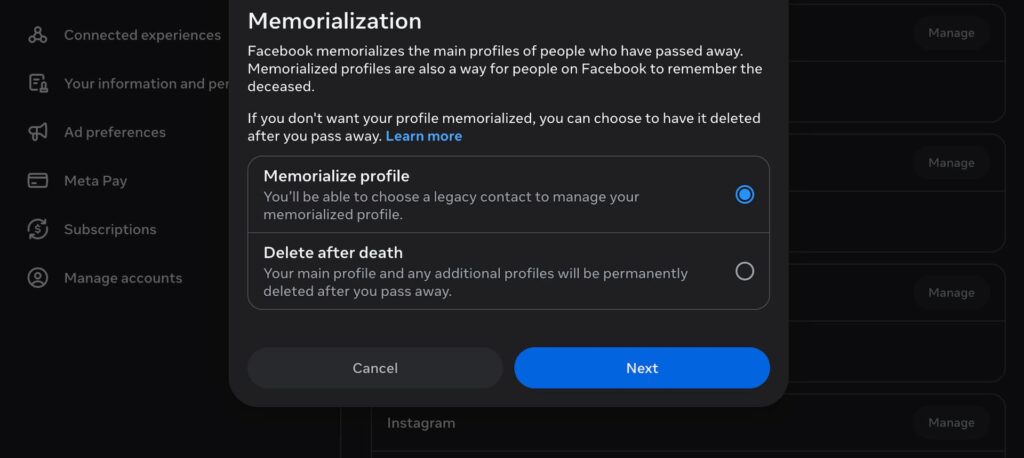
Instagram follows Facebook’s policies on memorialization. LinkedIn and X (formerly Twitter) allow family members to request removal but offer no memorialisation option. TikTok has no formal memorialisation process yet, though one is reportedly in development. WhatsApp messages are encrypted and cannot be retrieved, the account can only be deactivated.
Without any instructions from you, your family’s options are limited to requesting deletion or memorialisation. They cannot access the content of your accounts. They cannot retrieve photos, messages, or posts before the account closes.
Email is often the most important and most overlooked account in a digital legacy, but it is the key to resetting passwords, managing correspondence, and accessing years of stored documents.
Gmail, Outlook, and most other email providers do not allow family members to access an account without legal documentation or advance preparation. Google’s Inactive Account Manager lets you set up instructions in advance — including who can access your data and what should be deleted after a period of inactivity. Without that setup, your family faces a case-by-case review that may take weeks and offers no guarantees.
The practical consequence is significant. If your family cannot access your email, they may also be unable to reset passwords for other accounts, receive correspondence related to your estate, or retrieve documents you stored there.
Subscriptions and ongoing payments
Streaming services, software licences, and cloud storage plans do not cancel automatically after death. They keep charging until someone manually cancels them.
Netflix, Spotify, Amazon Prime, Disney+, and every other subscription service will continue billing the card on file until a family member logs in and cancels, or contacts the provider with documentation. This can go unnoticed for months, particularly if the payments are coming from a joint account or a card that is still active.
The process for cancelling a deceased person’s subscription varies by provider. Some will cancel on receipt of a death certificate. Others require login access. A few have no formal process at all and will simply continue charging until the card is cancelled at the bank.
The simplest solution is to leave a list of your active subscriptions alongside your login details, so your family knows what exists and how to stop it.
Cloud storage and photos
Cloud storage services may hold the only copies of irreplaceable family photos — and access is far from automatic for family members.
Apple’s iCloud, Google Photos, Dropbox, and OneDrive each handle this differently. Apple introduced a Digital Legacy feature that lets you designate a legacy contact who can request access to your iCloud data after death. Google offers a similar option through the Inactive Account Manager. Dropbox and OneDrive require legal documentation and review the request case by case.
Without advance preparation, your family may find themselves locked out of years of photos, videos, and documents. Unlike social media profiles, cloud storage accounts rarely stay visible after death — they simply become inaccessible. And unlike financial accounts, there is often no legal process that can reliably retrieve the content once access is lost.
Financial accounts and cryptocurrency
Online banking and investment platforms are part of your estate and are typically accessible to executors through the legal probate process, but cryptocurrency is a different matter entirely.
Online bank accounts, PayPal, investment platforms, and pension portals all have processes for handling deceased account holders. Executors and administrators can usually gain access through the probate process, provided they have the right documentation.
Cryptocurrency is the exception. Bitcoin, Ethereum, and other digital assets are controlled through private keys — not through a bank or institution. If your family does not have access to those keys, the assets cannot be recovered. There is no customer service line, no reset process, and no legal mechanism that can retrieve them. Cryptocurrency needs to be explicitly included in your digital legacy plan, with wallet details and private keys stored somewhere secure and accessible to the right person.
What your family will actually face
Without any record from you, your family will spend significant time and energy trying to piece together your digital life at the worst possible moment.
They will not know which accounts exist. They will not have the passwords. They will contact platforms one by one and navigate each provider’s process separately — some straightforward, many not. They will discover subscriptions they did not know about, still charging weeks after your passing. They may find cloud accounts they cannot access, containing photos they cannot retrieve.
You get the point. This isn’t impossible to handle but just really much harder than it should be without preparation. And some of it, especially cloud photos and cryptocurrency, can be genuinely irreversible once the window closes.
What you can do now
The most useful thing you can do is make a list of your accounts, record your wishes for each one, and store your access details somewhere your trusted contacts can find them.
Start with the accounts that matter most. Email first as it is the master key to everything else. Then banking and financial accounts. Then social media. Then subscriptions and cloud storage.
For each account, think about three things: what you would want to happen to it, who should handle it, and where the access details are. You do not need to hand over passwords right now but make sure your trusted people can find them when necessary.
For platforms that offer advance settings — Facebook’s legacy contact, Google’s Inactive Account Manager, Apple’s Digital Legacy — take five minutes to set them up. They are the simplest way to ensure your wishes are followed without requiring your family to navigate a legal process.
How Meolea helps
Nobody sits down one afternoon and thinks: today I will sort out all my online accounts. Not even we thought that…ever. It is the kind of task that stays on the list indefinitely until it is too late for it to be on anyone’s list.
But with Meolea, you can make this super simple for yourself and your family and it takes only a couple of minutes.
Meolea is a family handover platform where you record your online accounts, your wishes for each one, and the access details your trusted contacts will need — alongside your documents, your personal letters, and everything else that matters. Your family does not have to contact platforms one by one or guess at what you would have wanted. It is all there, organised, and ready for the people who need it at the moment they need it.
Frequently asked questions
Can my family access my accounts after I die without a password?
For most accounts, not easily. Social media platforms allow family members to request memorialisation or deletion without login access, but they cannot retrieve content. Financial accounts can usually be accessed through the probate process with the right legal documentation. Email and cloud storage are harder — advance preparation is the most reliable solution.
What happens if nobody reports my death to a platform?
The account stays active. Posts remain visible, subscriptions keep charging, and the account may continue appearing in friend suggestions or search results. Nothing changes until someone contacts the platform to request it.
Do I need a separate digital will?
Not necessarily. Your wishes for digital accounts can be included in a standard will or left as a separate written record alongside your other estate documents. What matters more than the format is that the record exists and that your trusted contacts know where to find it.
Which accounts are the most urgent to plan for?
Email, cloud photo storage, and cryptocurrency are the highest priority — these are the accounts where access is hardest to establish after death and where content is most likely to be permanently lost. Social media and subscriptions matter too, but the consequences of delay are less severe.
How often should I update my account records?
Once a year is a reasonable habit, and whenever you open a new account, acquire cryptocurrency, or change who you would trust to manage things.