



Most people assume platforms handle this automatically. They do not. Every platform has its own process, its own requirements, and its own definition of what “handling it” even means. Some are straightforward. Others require legal documentation, persistence, and weeks of back-and-forth with a support team.
This guide explains what actually happens to your social media accounts after death — platform by platform — and what you can do now to make things easier for the people you love.
What actually happens to your accounts?
When a social media user passes away, their account typically stays active until someone reports the death to the platform — and what happens next depends entirely on which platform it is.
There is no central system that registers a death and notifies your platforms. No automatic process that closes accounts or notifies family. Each platform operates independently, under its own terms of service, and most require a family member or executor to initiate whatever process exists.
In practice, this means your family may not know which accounts you had. They may not know what to do with them. And by the time they figure it out, some content may already be gone — or worse, the account may have been sitting open and vulnerable for months.
💡Read More: What happens to all your online accounts when you die?
Platform by platform: what each one does
The major platforms have developed policies for deceased users, but the processes vary significantly in how much control they give families.
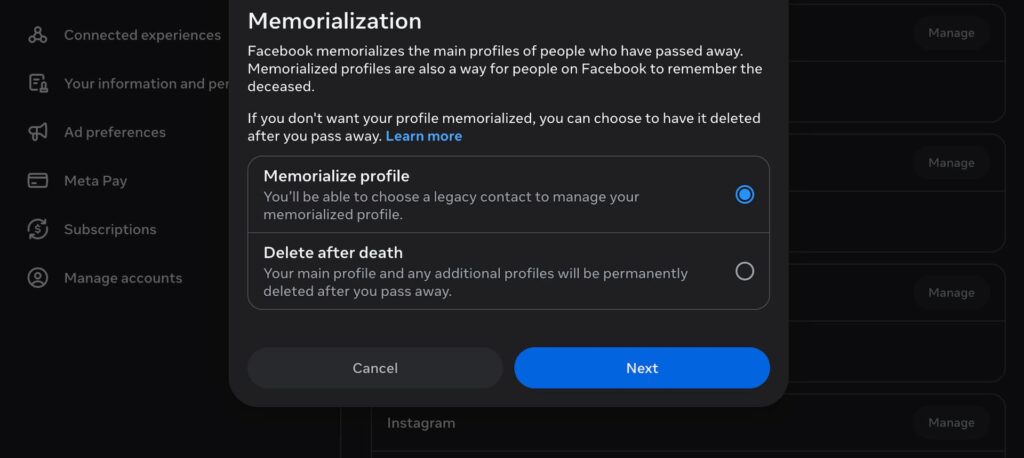
Facebook has the most developed system of any major platform. A family member or friend can request memorialisation, which adds a “Remembering” label to the profile and locks it from login. Existing content stays visible to whoever could already see it. You can also designate a legacy contact in advance — someone who can pin tribute posts, accept friend requests, and update the profile picture, but cannot read private messages or log in. If you prefer, you can choose in your account settings to have it permanently deleted after death rather than memorialised.
Instagram follows Facebook’s policies since Meta owns both platforms. Family members can request memorialisation or deletion, with proof of death required. There is no legacy contact option for Instagram the way there is for Facebook — no one can manage the account after death, only request what happens to it.
X (formerly Twitter) does not offer memorialisation. Family members can request account deactivation by submitting a death certificate and proof of relationship. The account and its content are then removed. There is no option to preserve it as a memorial.
LinkedIn has a basic reporting process. Family members can request removal of a deceased person’s profile. There is no memorialisation feature and no formal executor system. The process is straightforward but offers little flexibility.
TikTok currently has no memorialisation feature, though reports suggest one is in development. Family members can contact support and request account deletion with documentation. Without that request, the account stays active indefinitely.
YouTube is linked to a Google account, which means it falls under Google’s broader account policies. Google’s Inactive Account Manager lets you set up instructions in advance — including who can access your data and what should be deleted. Without that setup, your family faces a case-by-case review process that offers no guarantees.
WhatsApp messages are end-to-end encrypted and not accessible to anyone other than the account holder. The account can be deactivated by a family member with proof of death, but the content of conversations cannot be retrieved.
| Platform | Default after death | Memorialisation | Deletion | Advance settings |
|---|---|---|---|---|
| Stays active | Yes | Yes | Legacy contact | |
| Stays active | Yes | Yes | No | |
| X / Twitter | Stays active | No | Yes | No |
| Stays active | No | Yes | No | |
| TikTok | Stays active | Not yet | Yes | No |
| YouTube | Linked to Google account | Via Google | Via Google | Inactive Account Manager |
| Stays active | No | Yes | No |
Memorialisation or deletion: which is right?
Memorialisation preserves an account as a place for remembrance; deletion removes it entirely — and there is no universal right answer.
Some families find real comfort in a memorialised profile. It becomes a place where people can still leave messages, share memories, and mark anniversaries. For a person who was active on social media, a profile can feel like a meaningful continuation of their presence.
Others find the opposite. An active-looking profile can feel disorienting — seeing a birthday notification for someone who has passed, or having an account appear in friend suggestions. Some families prefer a clean break.
The most important thing is that you decide, not your family. If you have a strong feeling either way, record it somewhere your trusted contacts will find it. Most families would rather follow your wishes than spend emotional energy debating what you would have wanted.
The accounts people forget about
Social media is only part of your digital presence — subscriptions, email, and cloud storage create a separate set of challenges that families often encounter unprepared.
Streaming services like Netflix, Spotify, and Amazon Prime do not cancel automatically after death. They keep charging whoever’s card is on file until someone logs in and cancels, or contacts the provider with documentation. This can go on for months if nobody has the login details.
Email is often the key to everything else. It is how platforms send password resets, how estates receive correspondence, and where years of important documents may be stored. Without access, families can find themselves locked out of accounts they have every right to manage.
Cloud storage — Google Photos, iCloud, Dropbox — may hold the only copies of family photos that do not exist anywhere else. Apple and Google both offer legacy access features that can be set up in advance. Without them, the process of gaining access can take weeks and is not always successful.
These are covered in more detail in our guides on how to give your family access to your accounts and what a digital legacy includes.
What you can do now
The single most useful thing you can do is record your wishes for each account — memorialise, delete, or leave to someone specific — and make sure the right person knows where to find that record.
For Facebook, set up a legacy contact today. It takes two minutes and means your family will not have to navigate the request process under pressure. You can find the option under Settings > Memorialisation Settings.
For Google, visit the Inactive Account Manager and set up what should happen to your data after a period of inactivity. This covers Gmail, Google Photos, YouTube, and Google Drive in one place.
For everything else, write it down. Which platforms you use, what you would want to happen to each one, and where your login details are stored. You do not need to hand over passwords right now. You just need to make sure the right person can find them when the time comes.
You do not need to do all of this in one afternoon. Starting with the platforms you use most is enough.
How Meolea helps
Most people never get around to setting up a legacy contact or writing down their account wishes. Not because they do not care, but because there is never an obvious moment to do it.
Meolea is a family handover platform where you record your digital accounts, your wishes for each one, and the access details your trusted contacts will need — alongside your documents, your personal letters, and everything else that matters. Your family does not have to contact platforms one by one, guess at passwords, or argue about what you would have wanted.
It is not something you do for yourself. It is something you do so that the people you love do not have to.
Frequently asked questions
Can my family access my social media accounts after I die?
Not without advance planning or legal documentation. Most platforms require a death certificate and proof of relationship before they will take any action. Without your login details or a designated legacy contact, your family can request memorialisation or deletion, but cannot access the content of your account.
What happens to my Facebook account if I do nothing?
It stays active indefinitely. Posts remain visible, the account may still appear in friend suggestions, and birthday reminders may still be sent to your contacts. Someone will eventually need to report the death to Facebook for anything to change.
Can I choose to have my accounts deleted rather than memorialised?
Yes, for most major platforms. Facebook lets you record this preference directly in your account settings under Memorialisation Settings. For other platforms, leaving written instructions with your trusted contacts or digital executor is the most reliable approach.
What if my family cannot access my accounts at all?
They can still request memorialisation or deletion from most platforms without needing login access. What they cannot do without your credentials is retrieve content — photos, messages, saved posts — before the account is closed. This is why recording access details in advance matters.
What is a legacy contact and do I need one?
A legacy contact is the person you designate on Facebook to manage limited aspects of your profile after death. They can pin tribute posts, accept friend requests, and update your profile picture, but cannot log in or read your private messages. It is the simplest and most direct way to ensure your Facebook profile is handled according to your wishes — and it takes two minutes to set up.
Do subscriptions like Netflix cancel automatically after death?
No. Streaming services, software subscriptions, and cloud storage plans continue charging until someone cancels them manually. Your family will need your login details or access to the payment method to stop the charges.